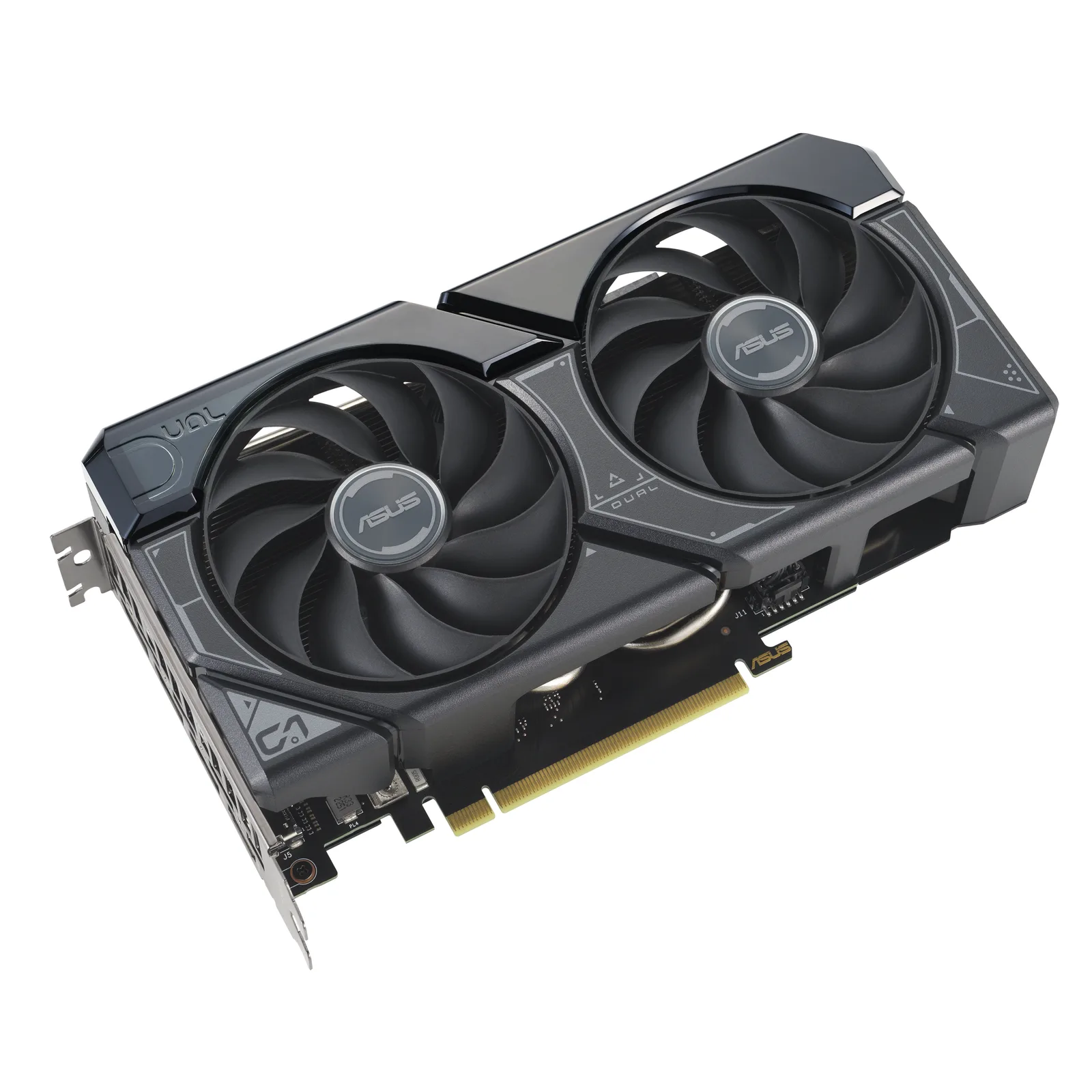
Still the best value entry point into 1080p 144Hz gaming — but 2026's DRAM and NAND shortage has pushed the realistic budget from last year's ~$750 to closer to $950. Every part below is a currently-listed SKU, not a wishlist price from a 2025 build guide.
| Component | Model | Price | Why it’s here |
|---|---|---|---|
| GPU | RTX 4060 8GB | ~$339 | Best perf/$ at 1080p with DLSS 3 headroom — up from its $299 launch MSRP but still the class leader |
| CPU | Ryzen 5 7500F | ~$145 | No iGPU, 6C/12T, no bottleneck at this GPU tier — AM5's cheapest true six-core chip |
| RAM | 16GB DDR5-6000 CL30 (2×8GB) | ~$220 | 32GB kits now run $400+ after 2026's DRAM shortage — 16GB is the realistic budget-tier call this year |
| Storage | 1TB NVMe Gen4 | ~$110 | Fast load times, room for 4–5 large titles — SSD prices have also climbed in 2026's NAND squeeze |
| PSU | 650W 80+ Bronze | ~$65 | Headroom for a future GPU upgrade without a full teardown |
| Case + fans | Mesh-front mid-tower, 3–4 fans included | ~$60 | Mesh-front cases run GPU temps 5–10°C cooler than glass-front equivalents under load |
Build overview
This build still targets the sweet spot most PC gaming budgets actually live in: a locked 144fps in competitive titles like Valorant, and a stable 60–75fps at high settings in demanding single-player games like Cyberpunk 2077. What's changed since last year's version of this guide isn't the GPU choice — the RTX 4060 is still the clearest perf-per-dollar pick at this tier — it's everything around it.
2026 has been a brutal year for memory pricing. A 32GB DDR5-6000 kit that cost around $80 in mid-2025 is now running $400+ at major retailers, driven by AI infrastructure demand pulling DRAM production away from consumer parts. NAND (SSD) pricing has climbed alongside it, though less dramatically. The practical result: a "$750 budget build" from a 2025 guide simply doesn't exist at current prices without gutting the RAM or storage. This build is priced at $920–950, with every component checked against currently-listed retailer pricing rather than carried over from an older build guide.
Parts list & price breakdown
Component order below follows spend priority — where the budget should go first if you need to trim further.
| Component | Model | Price | Why it's here |
|---|---|---|---|
| GPU | RTX 4060 8GB | ~$339 | Best perf/$ at 1080p, DLSS 3 headroom |
| CPU | Ryzen 5 7500F | ~$145 | No iGPU, 6C/12T, no bottleneck at this tier |
| RAM | 16GB DDR5-6000 (2×8GB) | ~$220 | 32GB kits now cost $400+ — see note below |
| Storage | 1TB NVMe Gen4 | ~$110 | Fast load times, room for 4–5 large titles |
| PSU | 650W 80+ Bronze | ~$65 | Headroom for a future GPU upgrade |
| Case + fans | Mesh-front mid-tower, 3–4 fans | ~$60 | Airflow-first, keeps the 4060 cool and quiet |
Why 16GB and not 32GB this year: every build guide from 2025 recommends 32GB as the safe default. At 2026 prices that single component would eat nearly half this budget. 16GB DDR5-6000 is still enough for smooth 1080p gaming in the vast majority of current titles — it becomes a limiting factor mainly in heavy multitasking (game + OBS + Discord + browser with dozens of tabs) rather than in-game frame rate. If the DRAM market cools off, revisit this line first.
Expected performance
Figures below are aggregated from published RTX 4060 benchmark data at 1080p — not measured on this exact rig, and treated as directional rather than exact.
| Game | Settings | Avg FPS | 1% low |
|---|---|---|---|
| Valorant | High, no upscaling | 380+ | 300+ |
| Apex Legends | High | ~130 | ~100 |
| Cyberpunk 2077 | High, DLSS Quality | ~70 | ~55 |
Valorant numbers are well-documented and consistent across sources — the RTX 4060 comfortably clears 300+ fps at 1080p, so the CPU (not the GPU) becomes the limiting factor for competitive players chasing every last frame. Cyberpunk 2077 needs DLSS Quality upscaling to hold a steady 60fps+ at high settings without ray tracing; turning ray tracing on drops this into the 40–50fps range and pushes the game out of this build's comfort zone.
Do this in BIOS before you play anything
The most common way a correctly-built budget PC underperforms has nothing to do with the parts list. It is memory running at the wrong speed because nobody turned it on.
DDR5 does not boot at its advertised speed. Out of the box it runs at a conservative JEDEC default — typically 4800 — regardless of what the box says. The rated speed lives in a profile you have to enable: EXPO on AMD, XMP on Intel. It is one toggle in BIOS, it takes ten seconds, and skipping it costs real frames in exactly the CPU-limited situations this build cares about.
While you are in there, three more worth checking on a first boot:
- Confirm the boot drive is the NVMe you installed, not a leftover device.
- Check the CPU fan is reporting RPM. A cooler that is seated but not plugged in will boot, run, and throttle, and you will spend a week blaming the wrong component.
- Update the BIOS only if you have a reason — a CPU the board shipped before supporting, or a documented fix for a problem you actually have. Flashing firmware to feel thorough is a risk with no reward.
The four things that go wrong on build day
Specific to a build in this shape, in rough order of how often they happen:
- The 8-pin CPU power cable is not connected. It is at the top corner of the board, often behind the cooler, and the machine will do nothing at all without it. A completely dead build is this cable more often than it is any dead component.
- RAM is in the wrong slots. Two sticks go in slots 2 and 4, not 1 and 2. The manual says which; the board silkscreen usually does too. Wrong slots means single-channel performance or no boot.
- The GPU is not fully seated. It clicks. If it did not click, it is not in. Check after you close the case, because closing the case is what nudges it.
- Front panel connectors are one pin off. The power button not working is almost always this, and it is fixed by the motherboard manual rather than by worry.
Our accessories guide covers the tools that make each of these less likely.
Where this build is deliberately weak
An honest build guide says what it gave up, because every budget is a set of choices.
- Memory capacity. 16GB is the concession this year, and it is the one that will age first. It is enough for gaming today; it is tight the moment you add streaming or a large browser session alongside.
- Ray tracing. Available, not really usable. The RTX 4060 can run it; this build is not the place you will want to.
- 1440p. Possible with upscaling in many titles, not the target. If 1440p is the goal, the $1,200 1440p build is a more honest starting point than pushing this one.
- Storage headroom. One drive is enough to start and fills faster than people expect at modern install sizes. Plan a second one rather than a bigger first one.
Spending more: what actually returns the money
If the budget stretches, the order in which extra money pays off is not the order people assume.
- A second storage drive, or a larger first one. The cheapest quality-of-life improvement available and the one you notice weekly.
- 32GB of RAM, if and when DDR5 pricing softens. This is the line to revisit first — see our 32GB vs 16GB comparison for when it is worth it.
- A better monitor, if yours is a basic 60Hz panel. More impactful than any component upgrade on this list, and frequently overlooked because it is not "in the PC".
- The GPU, last. At this tier the card is well matched to everything around it, and stepping up means the rest of the build becomes the limit.
What we would not spend it on: a larger power supply, an AIO cooler, or faster memory timings. None of the three changes anything you will feel in this configuration.
Upgrade path
The 650W PSU and mesh-front airflow case leave room to drop in a higher-tier GPU (up to roughly an RTX 4070-class card) later without touching anything else. The CPU has no integrated graphics, so it stays fully dedicated to gaming and won't bottleneck a future GPU swap at this resolution. RAM is the one component worth revisiting first if DDR5 pricing normalizes — going from 16GB to 32GB is a drop-in upgrade on this same motherboard generation.
FAQ
Is 16GB of RAM really enough in 2026? For 1080p gaming specifically, yes, in the large majority of current titles. It's a compromise driven by pricing, not a recommendation born from preference — if budget allows later, 32GB is still the safer long-term target.
Can this build handle 1440p? Playable in most titles at medium-high settings, but 144fps at 1440p is out of reach for the RTX 4060 in demanding AAA games. This build is optimized for 1080p 144Hz specifically.
Why not wait for RAM prices to drop? Nobody has a reliable timeline for that. This build is priced for what's actually buyable today — the parts list can be revisited once the DRAM market shows signs of easing.
Sources
- Component pricing — aggregated from major US retailer listings and price trackers (camelcamelcamel, Pangoly, Newegg Insider, TechRadar), September 2026.
- DDR5/NAND 2026 price context — Newegg Insider ("DDR5 Memory in 2026"), Tom's Hardware RAM price index, TechRadar (TeamGroup 16GB kit pricing).
- GPU/CPU pricing — camelcamelcamel (RTX 4060), Pangoly and tech-insider.org (Ryzen 5 7500F).
- In-game FPS figures — aggregated from CheckFPS.io and fpscalculator.net public benchmark calculators, not tested by RigCrate on this exact configuration.
Strengths
- Locked 300+ fps in Valorant, comfortably over 100 fps in Apex Legends
- Every part currently in stock at listed price, cross-checked September 2026
- 650W PSU and airflow case leave room for a GPU upgrade later
- Quiet under sustained load — no blower-style cooling anywhere in the list
Weaknesses
- 8GB VRAM will cap high-res texture packs by 2028
- 16GB RAM (not 32GB) is a real compromise forced by the 2026 DDR5 price spike
- Cyberpunk 2077 needs DLSS to hold 60fps+ at high settings — no locked 144 in demanding AAA